
Last updated on
Nov 6, 2026
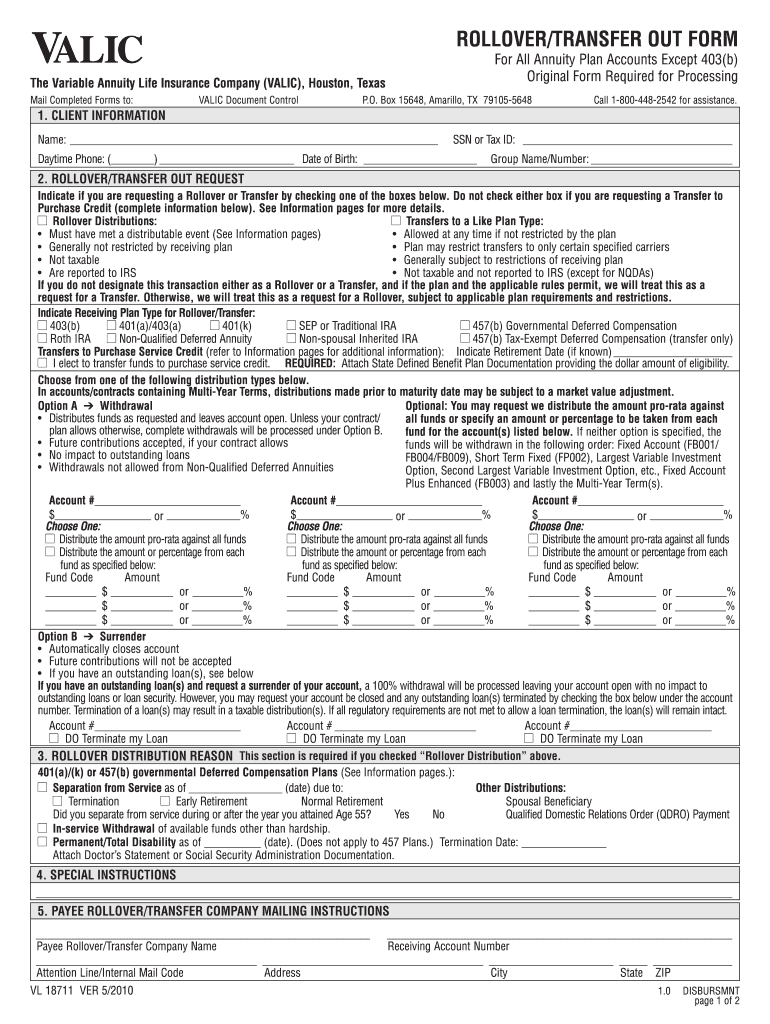
VALIC VL 18711 2010-2026 free printable template
pdfFiller is not affiliated with any government organization

Fill out
Complete the form online in a simple drag-and-drop editor.

eSign
Add your legally binding signature or send the form for signing.

Share
Share the form via a link, letting anyone fill it out from any device.

Export
Download, print, email, or move the form to your cloud storage.
Why pdfFiller is the best tool for your documents and forms


End-to-end document management
From editing and signing to collaboration and tracking, pdfFiller has everything you need to get your documents done quickly and efficiently.
Accessible from anywhere
pdfFiller is fully cloud-based. This means you can edit, sign, and share documents from anywhere using your computer, smartphone, or tablet.
Secure and compliant
pdfFiller lets you securely manage documents following global laws like ESIGN, CCPA, and GDPR. It's also HIPAA and SOC 2 compliant.
What is VALIC VL 18711
The VALIC Rollover/Transfer Out Form is a financial document used by clients of The Variable Annuity Life Insurance Company (VALIC) to request the transfer or rollover of funds from their annuity plan accounts.
pdfFiller scores top ratings on review platforms




Easy to use; was a life saver. Just very happy that it is there to help.
PDF filler has been the most flexible, user friendly pdf editor I've found.
Who needs VALIC VL 18711?
Explore how professionals across industries use pdfFiller.

VALIC VL 18711 is needed by:
-
Individuals looking to rollover or transfer their annuity funds
-
Spouses needing to provide consent for fund transfers
-
Plan administrators requiring documentation for fund movement
-
Financial advisors assisting clients with rollover processes
-
Clients of VALIC managing their retirement funds
Comprehensive Guide to VALIC VL 18711
What is the VALIC Rollover/Transfer Out Form?
The VALIC Rollover/Transfer Out Form is a crucial document for transferring or rolling over funds from VALIC annuity plans. It ensures that clients and administrators have the necessary information to manage annuity accounts effectively. This form is integral in executing financial transactions securely and efficiently.
Designed specifically for VALIC clients, this form facilitates the smooth transfer of funds. It is essential for organizing retirement finances, making it a vital tool for anyone with a VALIC annuity.
Purpose and Benefits of the VALIC Rollover/Transfer Out Form
The VALIC Rollover/Transfer Out Form serves multiple purposes, primarily providing a straightforward process for clients looking to manage their retirement funds. Utilizing this form can lead to simplified transfers, which can improve access to better investment options.
Detailing information is integral to ensure a smooth transaction. Clients benefit from recognizing the advantages offered by this form, which supports optimal fund management and flexibility in their retirement plans.
Who Needs the VALIC Rollover/Transfer Out Form?
This form is required by various individuals, including clients, spouses, financial advisors, and plan administrators. Each party plays a critical role in the successful completion of the transfer or rollover process.
Eligibility criteria dictate who must sign the form, and it is crucial for all parties involved to understand their responsibilities in ensuring compliance and proper processing.
How to Fill Out the VALIC Rollover/Transfer Out Form Online (Step-by-Step)
Filling out the VALIC Rollover/Transfer Out Form online through pdfFiller is easy. Here’s how to complete it step-by-step:
-
Open the form in pdfFiller.
-
Enter your client information, ensuring all details are accurate.
-
Complete the spousal consent section if applicable.
-
Double-check all entries to avoid common errors.
-
Sign the form digitally or prepare for notarization, if needed.
Each field is designed to capture essential details, facilitating a smooth rollover or transfer experience.
Required Documents and Supporting Materials
When submitting the VALIC Rollover/Transfer Out Form, certain documents are needed to complete the process:
-
Valid identification (e.g., driver's license).
-
Details of the prior plan from which the funds are being rolled over.
-
Any required notarized documents, if applicable.
Understanding these requirements will help prevent delays and ensure a successful transfer.
How to Sign or Notarize the VALIC Rollover/Transfer Out Form
When completing the VALIC Rollover/Transfer Out Form, it is important to recognize whether a digital signature or a wet signature is required. If notarization is necessary, follow these steps:
-
Sign the document in the designated areas.
-
Visit a notary public if notarization is needed.
-
Ensure the notary provides their official stamp on the document.
Securing the proper signatures and notarizations is critical for the validity of the form.
Submission Methods and Where to Submit the VALIC Rollover/Transfer Out Form
Once the VALIC Rollover/Transfer Out Form is completed, there are two primary methods to submit it:
-
Digital submission via pdfFiller for immediate processing.
-
Physical mail to the designated VALIC address for traditional submission.
To confirm that your submission has been received, follow up with the appropriate contact or utilize tracking methods if available.
Security and Compliance When Using the VALIC Rollover/Transfer Out Form
Utilizing the VALIC Rollover/Transfer Out Form through pdfFiller is secure. The platform employs encryption and adheres to regulatory standards such as HIPAA and GDPR compliance.
It is essential to ensure that sensitive financial information remains secure throughout the form-filling process. Understanding the security features of pdfFiller helps users feel confident in their transaction safety.
What to Expect After Submitting the VALIC Rollover/Transfer Out Form
After submitting the VALIC Rollover/Transfer Out Form, clients can expect certain timelines for processing. Typical processing durations may vary, so staying informed about the status is advisable.
Follow-up steps may include checking the status of your request through the VALIC website or contacting customer support for updates. Understanding these processes helps in managing expectations effectively.
Maximize Efficiency with pdfFiller for Your VALIC Rollover/Transfer Out Form
pdfFiller enhances the user experience for filling out the VALIC Rollover/Transfer Out Form with its unique capabilities. The platform simplifies the form-filling process, ensuring compliance and offering various features to streamline the task.
With an easy-to-use interface, pdfFiller allows users to start filling out their forms quickly and efficiently, promoting a hassle-free experience in managing their financial documents.
How to fill out the VALIC VL 18711
-
1.Access the VALIC Rollover/Transfer Out Form on pdfFiller by searching for the form name in the search bar.
-
2.Once the form is located, click to open it in the pdfFiller editor.
-
3.Gather required information such as client details, annuity account numbers, and the specific type of rollover or transfer requested before you start filling out the form.
-
4.Use pdfFiller's interface to navigate the form, filling in all necessary fields including your name, contact information, and other relevant details.
-
5.If applicable, ensure to complete the section requiring your spouse's consent by providing their information and signature in the designated area.
-
6.Complete the sections for plan administrator approval and financial advisor details by entering the necessary information or uploading supporting documents.
-
7.Once all sections are filled out, review the form carefully to ensure accuracy. Make sure all signatures required are present and legible.
-
8.To finalize your form, save your changes using the 'Save' option. You can also download a copy for your records by selecting the 'Download' button.
-
9.If submitting electronically is the preferred method, follow the instructions on pdfFiller to submit directly to VALIC or print it for postal submission.

Who is eligible to use the VALIC Rollover/Transfer Out Form?
Clients of The Variable Annuity Life Insurance Company (VALIC) seeking to transfer or rollover funds from their annuity plans are eligible to use this form. Spousal consent may also be required depending on the circumstances.
What supporting documents are required when submitting this form?
You typically need to provide your annuity account information, identification verification, and possibly spousal consent if applicable. Ensure all signatures are present to avoid processing delays.
How can I submit the VALIC Rollover/Transfer Out Form?
The form can be submitted electronically through pdfFiller or printed for postal submission to VALIC. Follow the submission instructions provided by your advisor or on the VALIC website.
What common mistakes should I avoid when completing this form?
Ensure all fields are filled out completely and legibly, double-check signatures, and confirm that required sections for spousal consent and approvals are done correctly to prevent rejection.
Are there any deadlines for submitting this form?
While specific deadlines may depend on your unique situation or investment type, it is generally advisable to submit the form at your earliest convenience, especially if you are working within a rollover window.
How long does it take to process the VALIC Rollover/Transfer Out Form?
Processing times can vary but typically are completed within a few weeks. To expedite processing, ensure all information is complete and accurate before submission.
Is notarization required for this form?
Yes, the VALIC Rollover/Transfer Out Form requires notarization. Ensure to have your signatures notarized before submitting the form.
Related Content
Related Forms
Related Catalogs
Get the latest insights from our blog


If you believe that this page should be taken down, please follow our DMCA take down process
here
.
This form may include fields for payment information. Data entered in these fields is not covered by PCI DSS compliance.